
Create Entra ID App Registration using PowerShell
Quite regularly teams need to create Entra ID App Registrations. One use case might be the onboarding of a SaaS (like ARGOS Cloud Security) into their environment. To simplify this process, we’ve developed a PowerShell script that automates the creation of an App Registration in Entra ID and assigns the necessary permissions.
The script can be found in this public repository: https://github.com/argos-au/azure-entraid-m365-tools
This PowerShell script (here: https://github.com/argos-au/azure-entraid-m365-tools/blob/main/entraid-m365/create-entraid-appregistration.ps1) is designed to streamline the process of creating an App Registration in Entra ID. Here’s what it does:
- Creates an Enterprise App and Registration: The script creates a new application in Entra ID with a specified or default name.
- Maps Permissions: It maps API permission names (e.g., “Application.Read.All”) to GUID-based resource permissions in the Microsoft Graph service principal.
- Assigns Permissions: Adds these permissions as application (role) or delegated (scope) permissions to your new app. The permissions hardcoded in the script are the permissions needed to support a continuous scan of Entra ID / M365 by ARGOS. For other use cases, update the permissions.
- Grants Admin Consent: Automatically grants admin consent for the assigned permissions.
- Generates a Client Secret: Creates a client secret valid for 6 months and outputs the final app information.
Requirements
Before running the script, ensure you have the following:
- Microsoft Graph PowerShell Module: Install the module if you haven’t already. (recommend using Cloud Shell on https://shell.azure.com )
- Authenticated Session: Connect to Microsoft Graph using Connect-MgGraph with sufficient privileges.
How to Use the Script
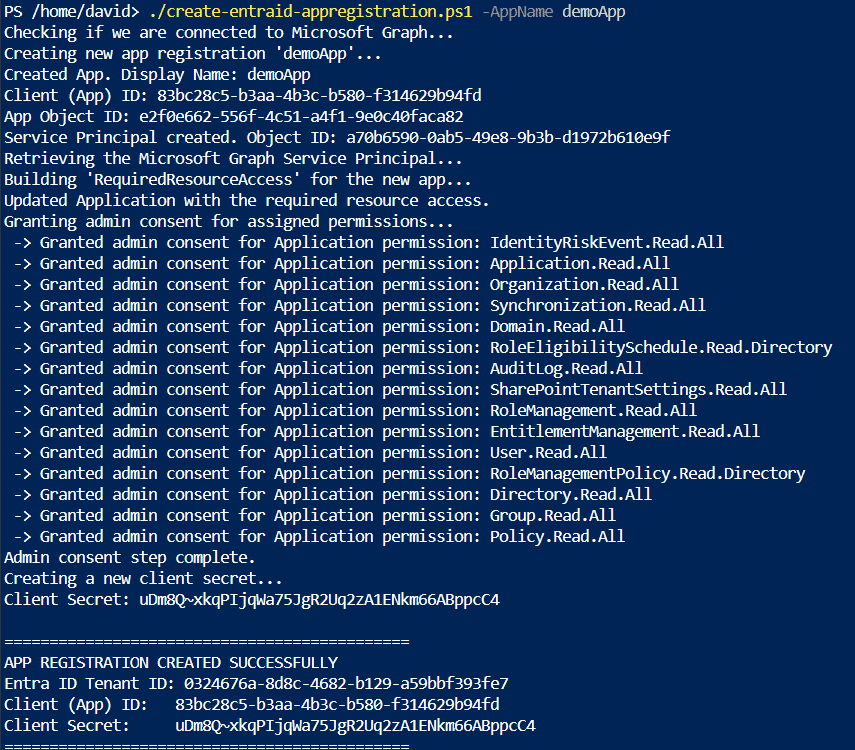
Using the script is straightforward. We recommend you run this script from within Azure Cloud Shell (https://shell.azure.com). You can run it with the default app name or specify a custom name:
.\create-entraid-appregistration.ps1 -AppName <newAppName>
Script Breakdown
Here’s a quick overview of what the script does:
- Check Connection: Ensures you are connected to Microsoft Graph.
- Create App Registration: Creates a new application in Entra ID.
- Create Service Principal: Creates a service principal for the new application.
- Assign Permissions: Maps and assigns the necessary permissions.
- Grant Admin Consent: Grants admin consent for the assigned permissions.
- Generate Client Secret: Creates a client secret and outputs the app information.
Use Case: ARGOS Cloud Security
Conclusion
Automating the creation of App Registrations in Entra ID can save you time and reduce the risk of errors. The create-entraid-appregistration.ps1 script is a tool that simplifies this process. Give it a try and see how it can streamline your workflow!