- Run multiple scripts and tools
- Collect findings and screenshots
- Manually correlate permissions and exposures
- Interpret hundreds of findings
- Produce diagrams and reports manually
- Repeat the process for each customer
Automated Cloud Security Assessments
Cloud security assessments without the manual work
Assess Azure, Entra ID, Microsoft 365 and AWS environments. Identify security weaknesses, investigate attack paths, prioritise remediation and produce actionable assessment reports for your customers.
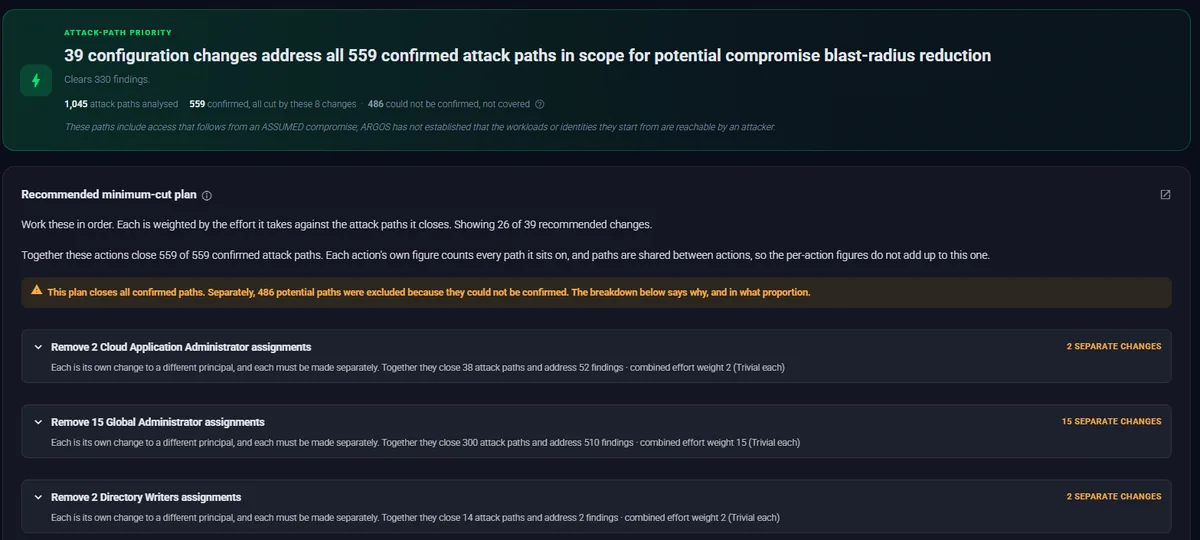
From manual assessment to repeatable delivery
The work of a cloud security assessment does not change from customer to customer. Doing it by hand each time is what makes it slow and inconsistent.
- Connect supported cloud environments
- Automate inventory and security assessment
- Investigate related findings and attack paths
- Prioritise meaningful security improvements
- Generate structured assessment deliverables
- Repeat the process consistently across customers
How an ARGOS assessment works
Agentless from the first connection to the delivered report. ARGOS reads configuration through the clouds' own management APIs, with read-only permissions, and installs nothing in the environment.
-
1
Connect
Sign in with Entra ID, use an app registration, or let ARGOS assume a read-only AWS role with an external ID it generates.
-
2
Assess
Inventory, configuration, identity and permissions are collected and checked, and reachability is tested for supported services.
-
3
Investigate
Findings are connected into attack paths and diagrams, each step carrying the evidence it rests on.
-
4
Deliver
Download a customer-focused assessment report from the dashboard and plan the remediation with your customer.
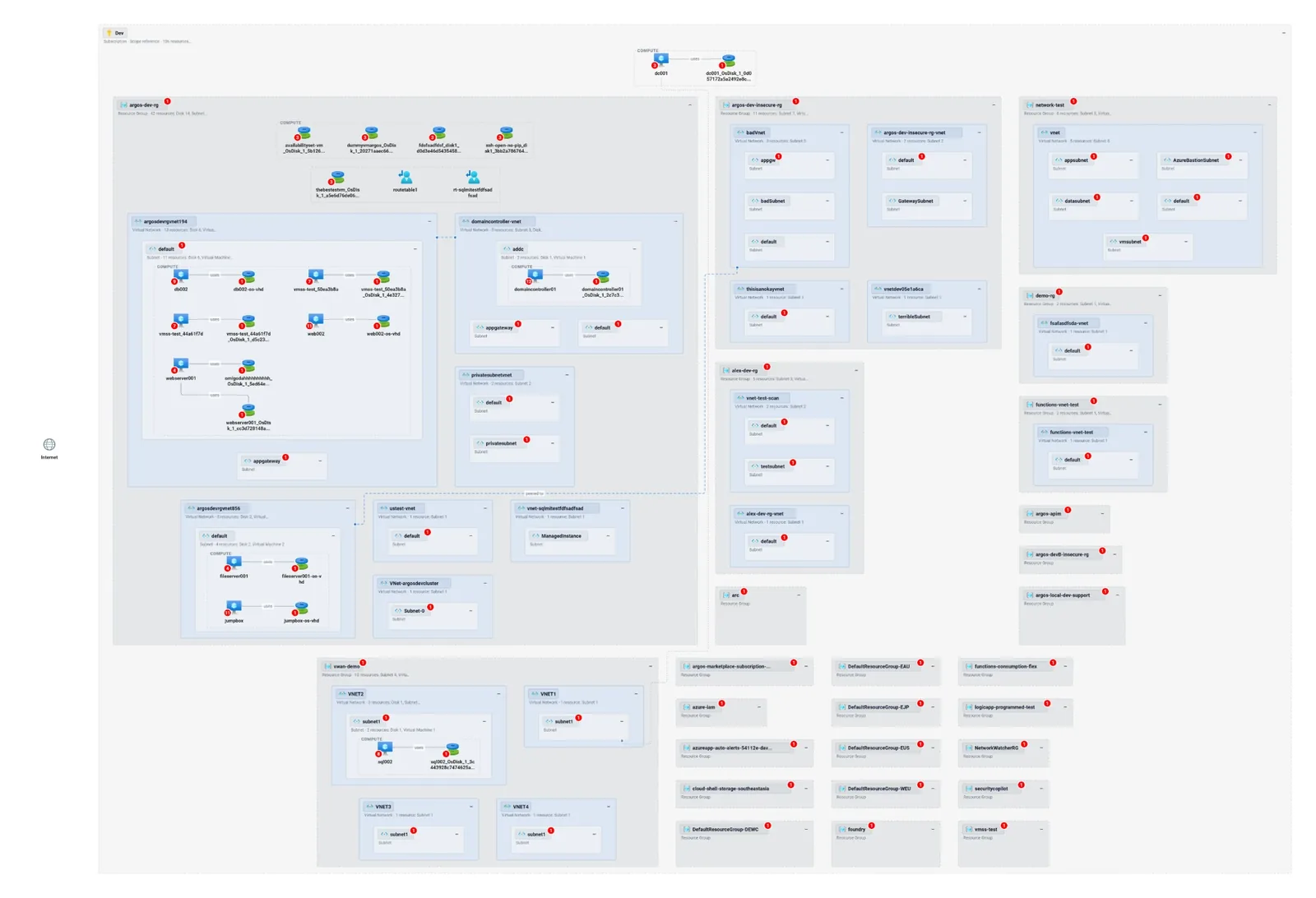
More than a list of security findings
Configuration checks tell you what is misconfigured. ARGOS also shows how the pieces connect, and which change matters most.
-
Configuration
Azure and AWS configuration assessments
Rules across compute, storage, networking, databases, key management, monitoring and identity, with reachability tested for supported Azure services and the full network path analysed for AWS EC2. How reachability works
-
Identity
Entra ID and Microsoft 365 security
Privileged roles, applications and service principals, Conditional Access coverage, and Exchange Online, SharePoint, Teams and Intune settings. The Entra ID assessment
-
Paths
Attack path analysis
How identities, permissions and resources combine into a route an attacker could take. Each path is marked confirmed, conditional or indeterminate from the proof behind its steps. Attack paths in detail
-
Access
Effective permissions and blast radius
What an identity can actually do once role definitions, scopes, deny assignments and locks are taken into account, and what it could reach from there.
-
Compliance
Compliance assessments
Findings mapped to ISO 27001, NIST SP 800-53 and 800-171, PCI DSS, the Microsoft Cloud Security Benchmark, the Australian ISM and Essential Eight, CISA SCuBA and AWS Foundational Security Best Practices. Supported frameworks
-
Delivery
Prioritised remediation and reporting
A minimum-cut plan names the changes that close the most attack paths, and the report turns the assessment into something a customer can act on. The deliverable
Understand what actually matters
A finding on its own rarely tells you how urgent it is. Its relationships do.
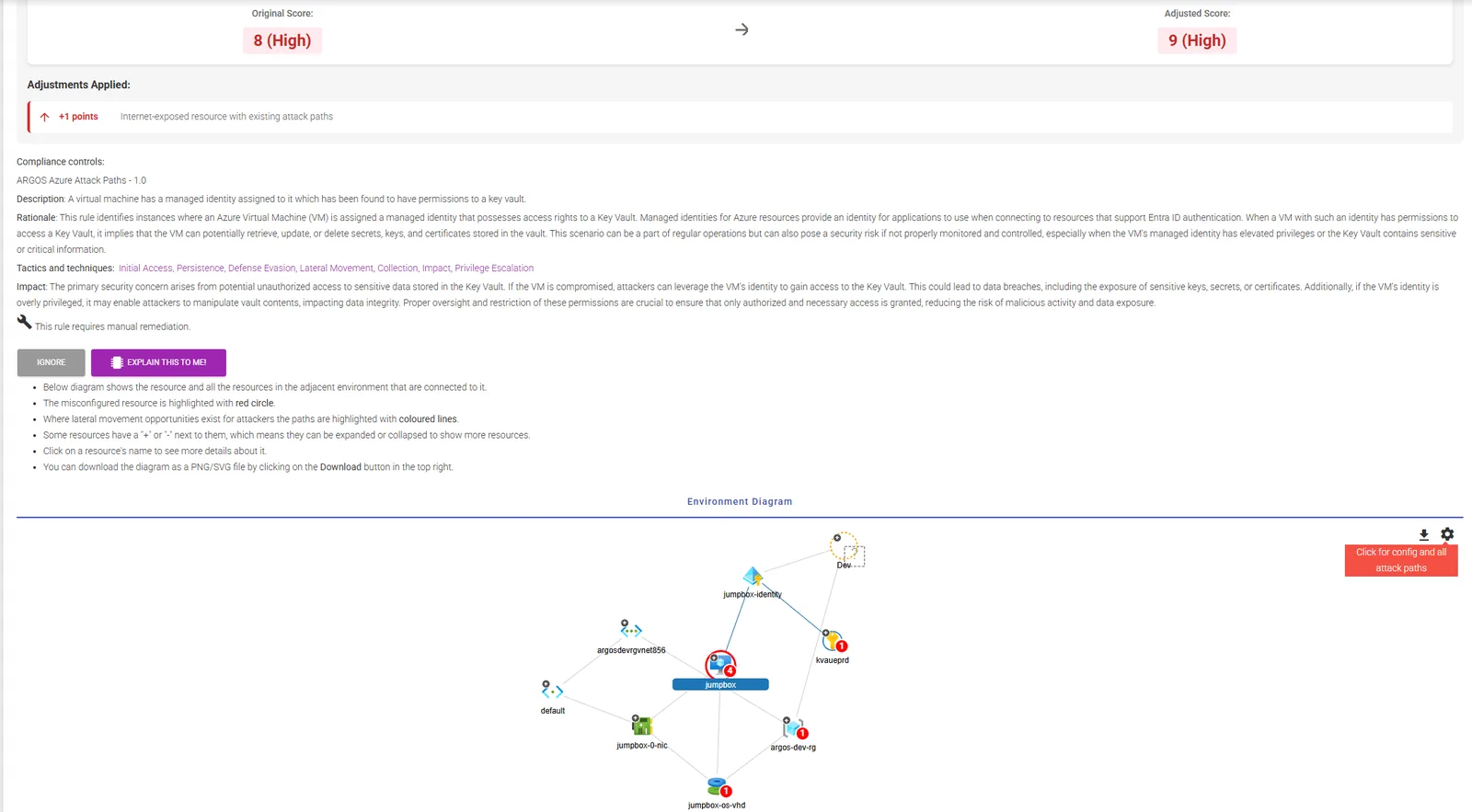
This finding comes from an ARGOS assessment of a demonstration tenant. A virtual machine has a managed identity with permissions to a key vault. That is a common, often legitimate design.
- The detection. The VM's managed identity can access the key vault, so code running on the VM could read or change its secrets, keys and certificates.
- The relationships. The same VM is exposed to the internet and already sits on attack paths. ARGOS raises the finding's score from 8 to 9 and says why: an internet-exposed resource with existing attack paths.
- The impact. If the VM were compromised, its identity would carry an attacker to the vault. ARGOS states this as a potential path. It does not claim the VM has been compromised.
- The remediation. The diagram shows the VM, its identity, the vault and the network around them, so the fix (narrowing the identity's vault permissions, or removing the exposure) can be chosen with the whole picture in view.
See the assessment deliverable
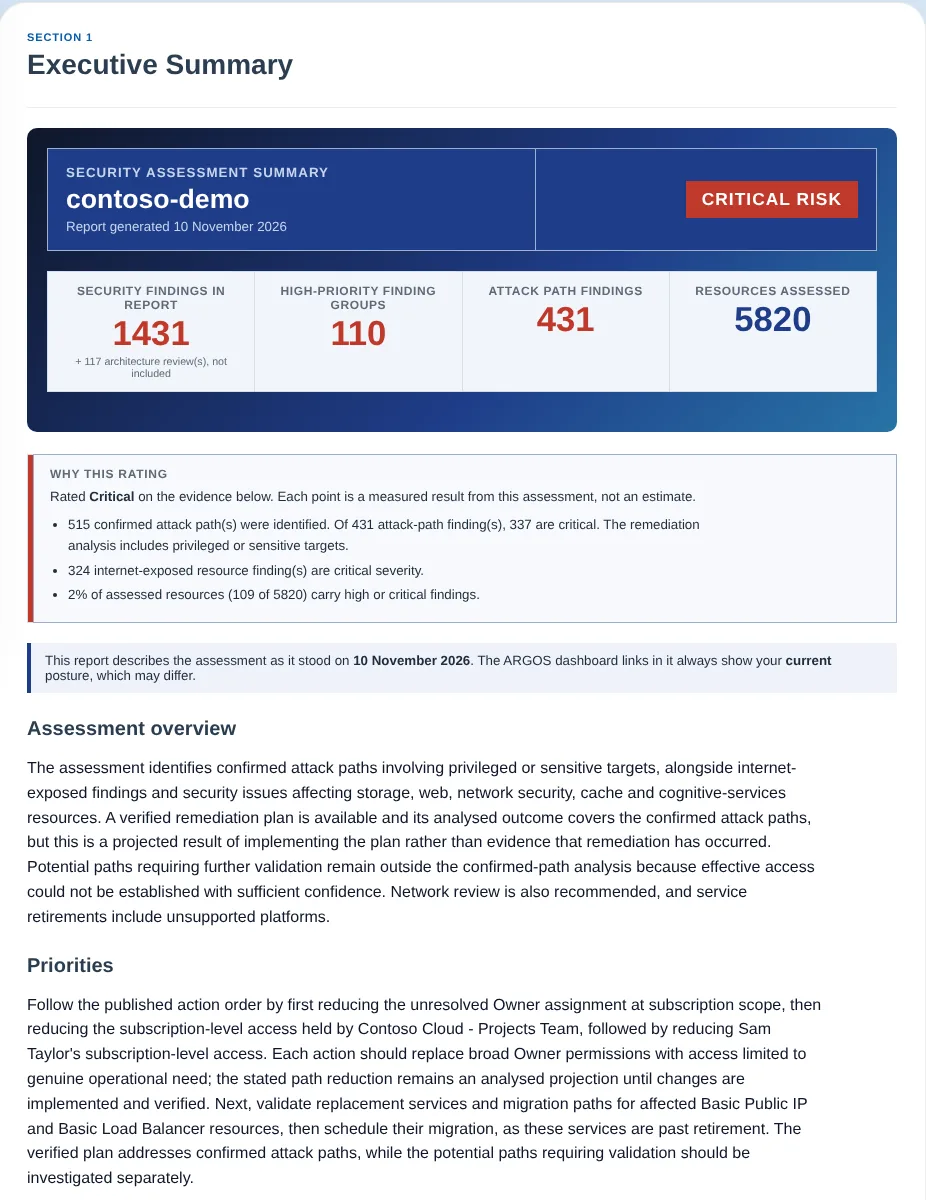
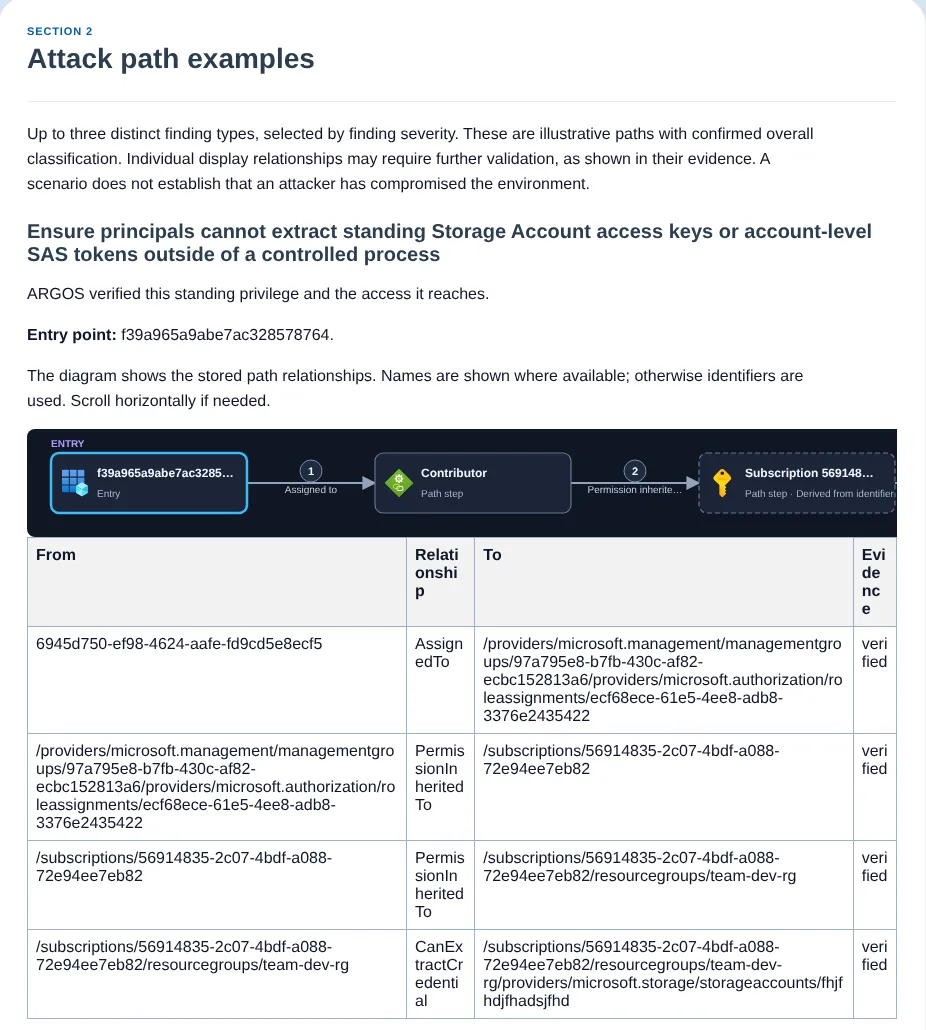
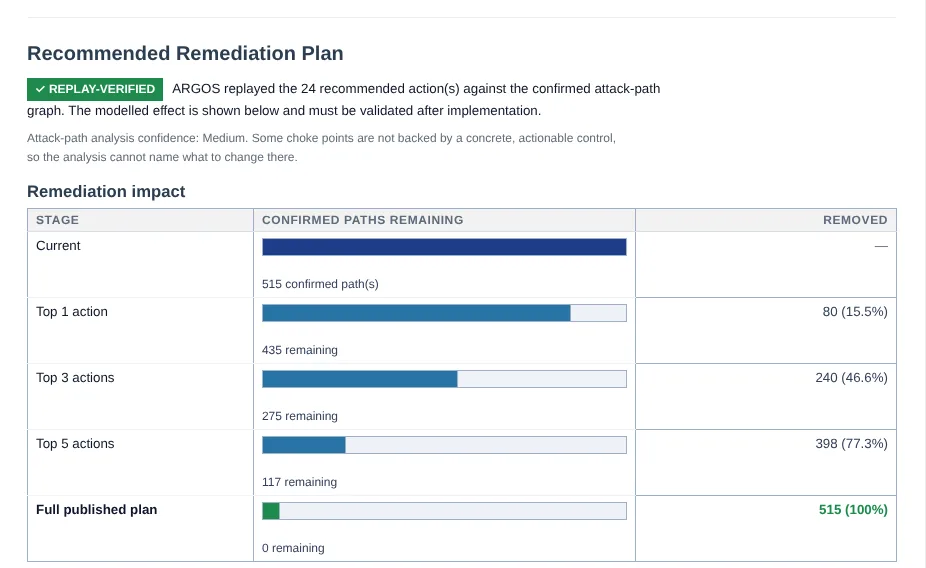
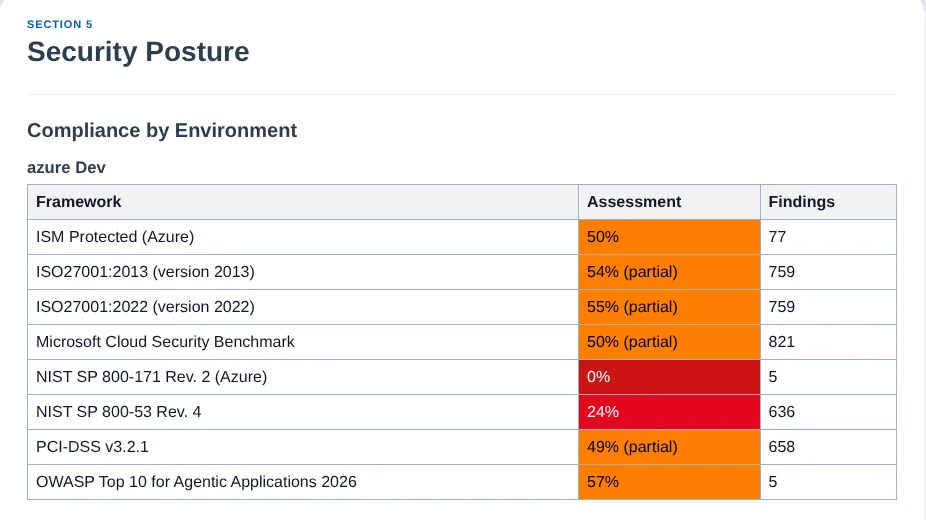
Every assessment produces a customer-focused report, downloaded from the ARGOS dashboard as a single ZIP by anyone authorised for that environment. It is written for the people who have to act on it, with links back into ARGOS for the full technical evidence.
- 01
Executive summary
- 02
Priority risks, with the technical findings and evidence behind them
- 03
Attack path examples, each with its confidence
- 04
Azure network and architecture summary
- 05
Compliance by environment
- 06
Recommended remediation plan and timeline
- 07
Conditional Access gaps, Zero Trust and internet exposure
Built for consultants and cloud teams
Consultants and MSPs
Run the same assessment for every customer, hand over a report that does not need rewriting, and turn the prioritised findings into a scoped remediation engagement. Team members see only the customer environments assigned to them.
Cloud administrators and security teams
Understand your own security posture, investigate how an exposure or a permission could be used, and decide which improvements to make first. Continuous scans run daily and can notify Slack, Microsoft Teams, Microsoft Sentinel or Jira when something new appears.
Security and deployment
What ARGOS needs, what it reads and where your data goes.
Agentless and read-only
Nothing is installed in your environment. ARGOS reads configuration through management-plane APIs and never reads data-plane content: it does not open files or blobs, query databases or read object contents. It changes nothing unless you enable remediation, which needs write permissions you grant separately.
The permissions it needs
Reader on Azure subscriptions. Read-only Microsoft Graph permissions for Entra ID and Microsoft 365, with Global Reader recommended for a one-off sign-in. For AWS, a cross-account role with the SecurityAudit and ViewOnlyAccess managed policies and a small custom read policy. Full permission lists
Collection and data handling
A one-off scan's credentials live only in an encrypted envelope that expires within 24 hours. Stored cloud credentials are encrypted with AES-256-GCM. You choose where your data is kept: Australia or the European Union. Trust Centre
- Microsoft Azure
- Microsoft Entra ID
- Microsoft 365
- AWS
- Azure AI Foundry
Questions about cloud security assessments
What does ARGOS assess?
Microsoft Azure, Microsoft Entra ID, Microsoft 365 (Exchange Online, SharePoint, Teams and Intune), AWS and Azure AI Foundry. ARGOS collects an inventory of the environment, checks its configuration, identities and permissions, tests reachability for supported services, and connects what it finds into attack paths and diagrams.
Does ARGOS install anything or change my environment?
No. ARGOS is agentless and uses read-only access to the clouds' management APIs. It changes nothing in your environment unless you enable remediation, where your plan includes it, and grant the write permissions that requires.
What permissions does an assessment need?
Reader on each Azure subscription; read-only Microsoft Graph permissions for Entra ID and Microsoft 365; and for AWS, a cross-account IAM role with the SecurityAudit, ViewOnlyAccess and AWSLambda_ReadOnlyAccess managed policies plus a small custom read policy. The FAQ lists every permission for one-off and continuous scans.
What do I receive at the end of an assessment?
A customer-focused assessment report, downloaded from the dashboard as a single ZIP: executive summary, priority risks, attack path examples, a remediation plan and timeline, compliance by environment, Conditional Access gaps, internet exposure and an Azure network and architecture summary. The full findings, evidence and diagrams stay available in the dashboard. Report files are kept for 7 days after they are generated.
Can I use ARGOS to assess my customers' environments?
Yes. ARGOS is built for consultants and MSPs who assess many environments. A one-off scan uses a sign-in or token that is never stored on the customer record, and team roles can be limited to the customer environments each person works on. See ARGOS for MSPs.
How long does an assessment take?
Collection and analysis are automated, and how long they take depends on the size of the environment: a small subscription finishes much sooner than a large Entra ID tenant. Reviewing the results, refining the recommendations and walking the customer through them is the part your team still owns.