Microsoft Entra ID Security Assessment

Understand who has access, what they can reach and where your security controls fall short

Assess Entra ID permissions, privileged identities, application access, Conditional Access gaps and identity attack paths. Understand how individual weaknesses combine into meaningful security risks.

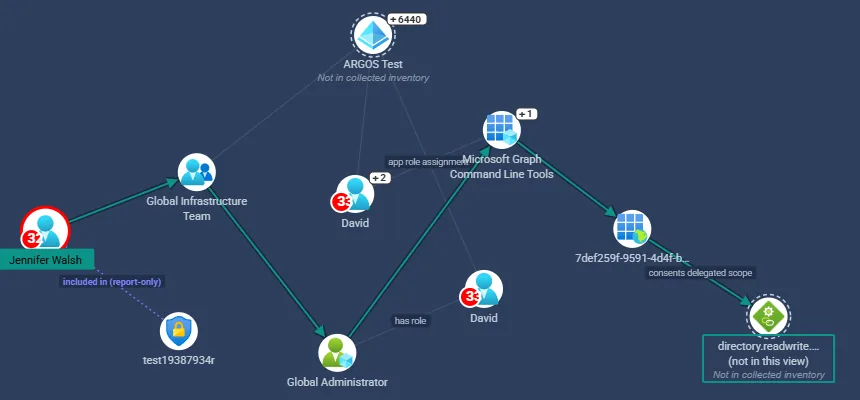
ARGOS Entra ID attack path in a demonstration tenant: a user, through a group holding the Global Administrator role, reaches an application's delegated Microsoft Graph permission
An Entra ID attack path from an ARGOS assessment of a demonstration tenant.

Identity security is more than privileged role assignments

A list of Global Administrators answers one question. The access that matters often runs through something else: a group that holds a role, an application someone owns, a consent granted years ago, an Azure role assigned to a service principal. ARGOS collects these relationships and evaluates them together.

  • Users and groups, including role-assignable groups and their owners
  • Directory roles, built-in and custom, read from what each role definition actually permits
  • Applications and service principals, their owners and their credentials
  • Delegated permissions and application permissions granted to apps
  • Azure role assignments held by Entra ID users, groups and service principals
  • Conditional Access coverage of every user in the tenant
  • Privilege escalation opportunities that chain these together

The question ARGOS answers is effective access: what an identity can actually do once groups, ownership, consents and role definitions are followed through, and what it would mean if that identity were compromised.

Privileged Identity Management is read too. A role someone is eligible for is shown as eligible, not as an active assignment, so the result reflects the access that exists today and the access that could be activated.

Find Conditional Access gaps

Having Conditional Access policies is not the same as every sign-in being protected. A tenant can require MFA on Windows and macOS and still leave Linux, or a client app type no policy names, with nothing enforced. Each policy looks right on its own; the gap only appears when you ask what applies to a particular user, application, platform and client.

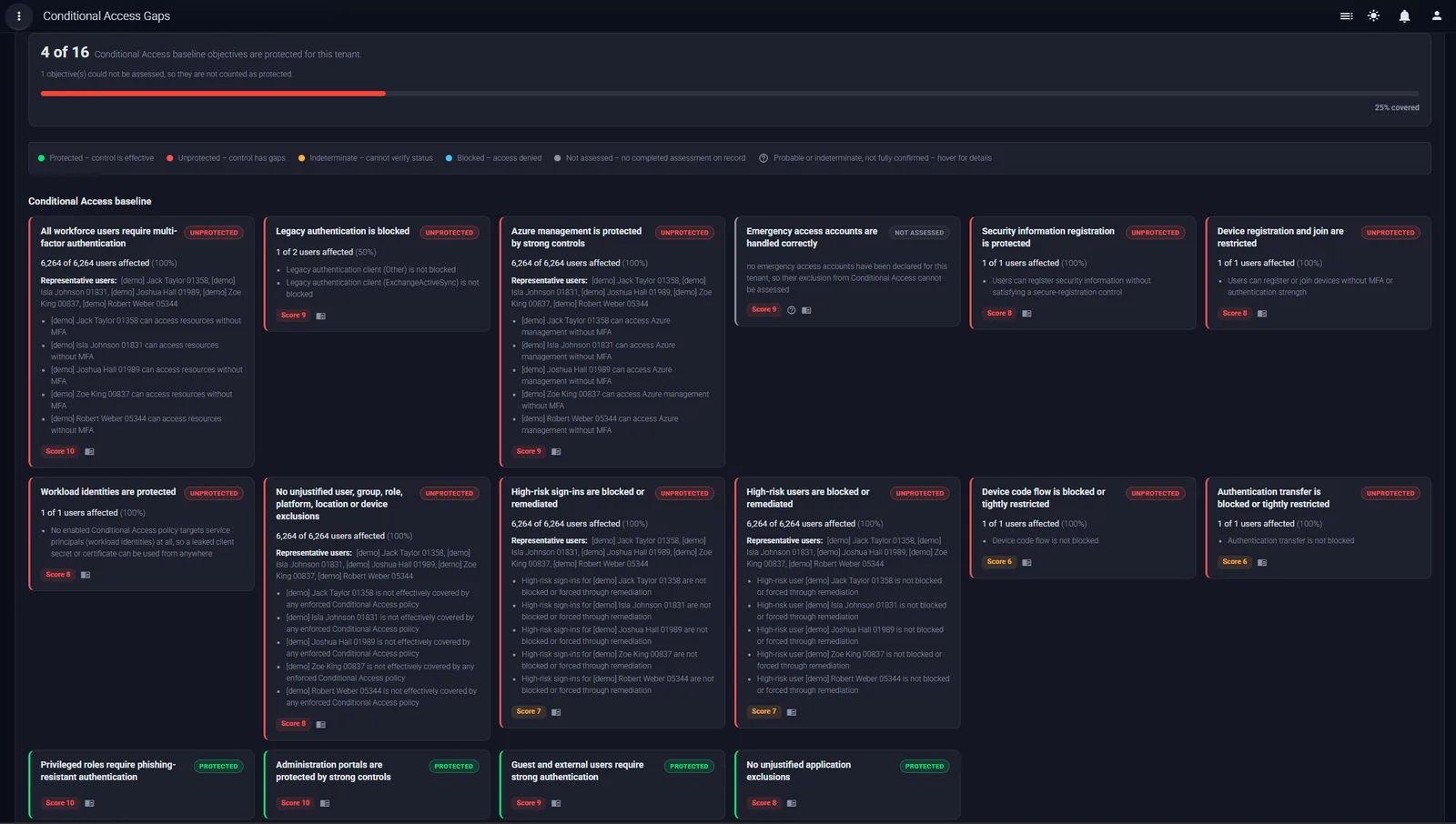
ARGOS Conditional Access gap analysis for a demonstration tenant: 4 of 16 baseline objectives protected. Each objective shows its status, the number of users affected, representative users and why they are not covered
Conditional Access gap analysis for a demonstration tenant: 4 of 16 baseline objectives protected.

Scenarios, not policies

ARGOS builds sign-in scenarios from your users, applications, device platforms and client app types, including a platform or client that no policy mentions, and evaluates every enabled policy that applies to each one together.

Measured against a baseline

The result is reported against ARGOS's minimum baseline objectives, such as MFA for all workforce users, legacy authentication blocked and phishing-resistant authentication for privileged roles, with the users affected and representative examples for each gap.

Honest about uncertainty

A scenario no single policy names is not automatically a gap: another policy may cover it. Where a condition cannot be evaluated, ARGOS reports the result as indeterminate rather than guessing, and an objective is shown as protected only when its assessment completed.

Investigate identity attack paths

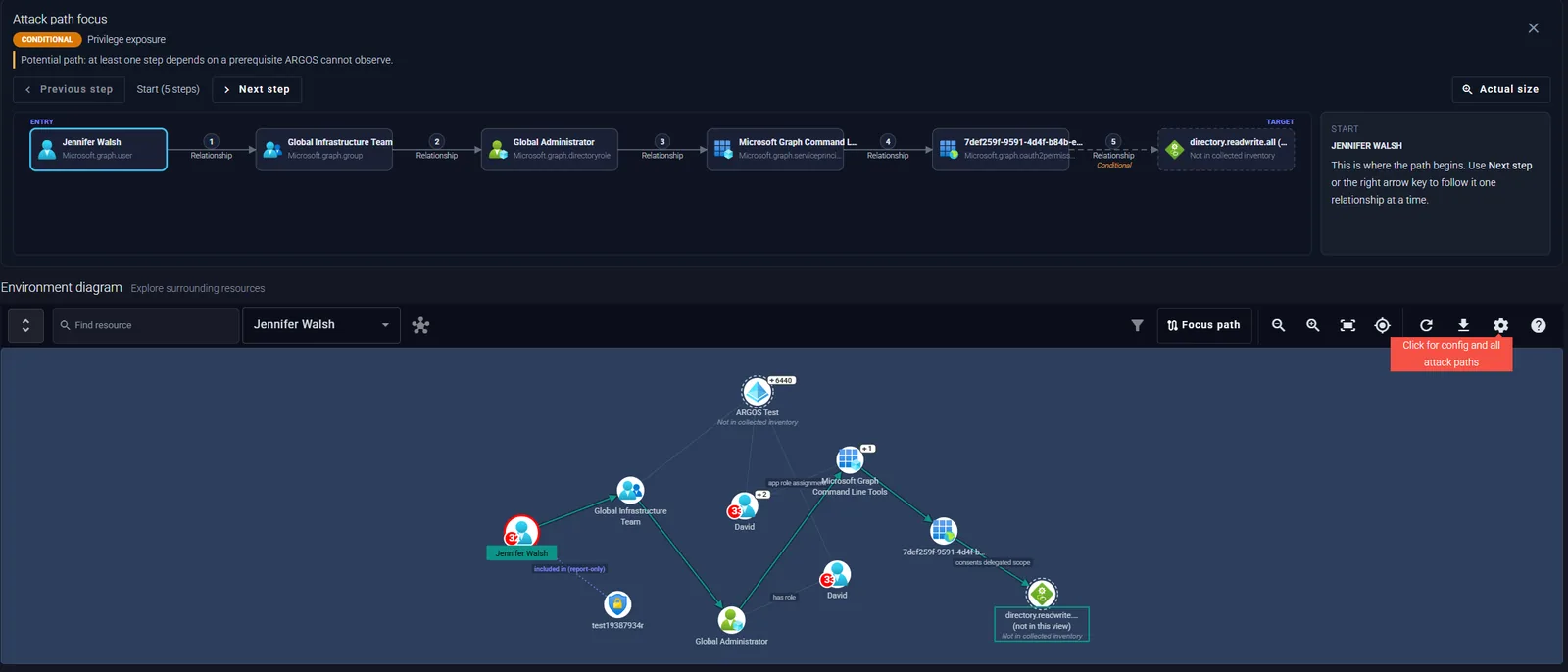
This path comes from an ARGOS assessment of a demonstration tenant. ARGOS labels it Conditional: a potential path, because at least one step depends on a prerequisite ARGOS cannot observe. It says so on the path rather than claiming more than the evidence supports.

ARGOS attack path focus view: Jennifer Walsh, a user, to the Global Infrastructure Team group, to the Global Administrator role, to the Microsoft Graph Command Line Tools service principal, to a delegated permission grant, to the Directory.ReadWrite.All permission. The last step is marked conditional
The attack path focus view: entry, five steps and the target.
  1. 01

    Starting identity

    Jennifer Walsh, an ordinary user account. The path asks what follows if this account is compromised.

  2. 02

    Relevant permissions

    She is a member of the Global Infrastructure Team group, and that group holds the Global Administrator role. Nothing is assigned to her directly, which is why a review of direct role assignments would not show it.

  3. 03

    Relationships and potential escalation

    Through the role, the path reaches the Microsoft Graph Command Line Tools service principal and a delegated permission grant made to it.

  4. 04

    Target and impact

    The grant consents to Directory.ReadWrite.All: read and write access to the directory. The final step is marked conditional, because it depends on a prerequisite ARGOS cannot observe.

  5. 05

    Evidence

    Every step carries the proof it rests on, taken from collected configuration, and the environment diagram shows the surrounding identities and resources so the path can be checked rather than taken on trust.

  6. 06

    Remediation

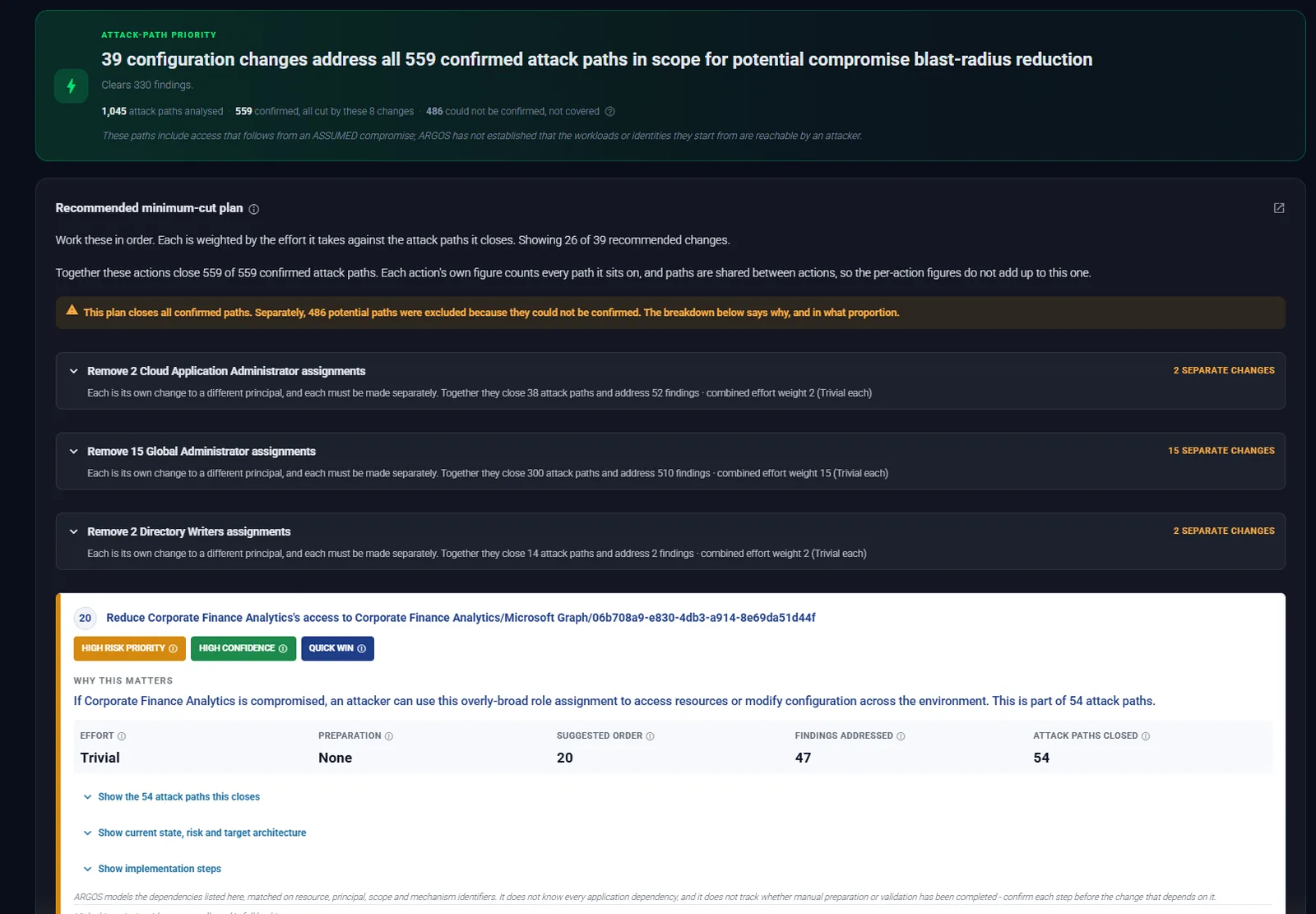
    In this tenant, ARGOS's remediation plan puts removing Global Administrator assignments first: 15 separate changes that together close 300 confirmed attack paths. For this path, removing the role from the group, or Jennifer Walsh from the group, breaks the chain at step two.

Understand blast radius and effective permissions

Before you remove a permission, you need to know what it actually allows and what depends on it.

ARGOS evaluates directory permissions from the actions each role definition grants, not from a list of role names, so a custom role that can change role-assignable group membership is treated exactly like the built-in role that can.

For Azure, it works out effective access from role assignments, scopes, deny assignments, management locks and enforced Azure Policy. The environment diagram then shows what a principal can reach, from a user through its groups and roles to the applications, service principals and resources beyond them.

That is the evidence you need to decide whether an excessive permission should be removed, constrained to a narrower scope or made eligible rather than standing, or formally accepted. An accepted finding can be ignored with a reason, and both the decision and who made it are recorded in the audit log.

ARGOS attack path focus view above an environment diagram showing the identities, groups, roles, applications and permissions around the path
The path and the environment around it, in one view.

Prioritise remediation

Hundreds of identity findings do not tell you where to start. ARGOS connects each one to what it affects and works out which changes close the most risk.

  • Findings classified by severity, with security failures kept apart from architecture reviews that depend on context ARGOS cannot see
  • Technical evidence for every finding, from the configuration that was collected
  • Potential attack paths each finding sits on, with their confidence
  • Remediation guidance for each finding, with ARGOS AI explanations in context
  • Impact and operational considerations: the effort, preparation and order of each change in the minimum-cut plan, and the findings and paths it addresses
ARGOS minimum-cut plan: 39 configuration changes address all 559 confirmed attack paths, with each change's effort, preparation, suggested order, findings addressed and attack paths closed
The minimum-cut plan: the fewest changes that close every confirmed attack path, in the order to work them.

How ARGOS fits existing tooling

ARGOS does not replace Microsoft's own controls or the open-source tools many identity teams already run. It answers a different question, and it has no integration with the tools below: they are used alongside it.

Microsoft Secure Score

Secure Score measures how far a tenant has adopted Microsoft's recommended settings. ARGOS asks what an attacker could do with the configuration as it stands, and which change would remove the most of that.

Maester

Maester runs configuration tests you can automate in your own pipeline. ARGOS adds the relationships between identities, roles, applications and Azure resources, and the attack paths that follow from them.

BloodHound

BloodHound maps attack paths in Active Directory and Entra ID through its own collectors. ARGOS covers Entra ID together with Azure, Microsoft 365 and AWS in one assessment, attaches proof to every step, and turns the result into a customer report and a remediation plan.

Entra ID security assessment questions

What does an Entra ID security assessment check?

Users, groups, directory roles (built-in and custom), PIM assignments and eligibility, applications and service principals and their permissions, Conditional Access policies and coverage, authentication settings, and Microsoft 365 settings in Exchange Online, SharePoint, Teams and Intune. ARGOS checks each against its rules, connects them into attack paths, and maps findings to frameworks including the Australian ISM, Essential Eight and CISA SCuBA.

Can ARGOS analyse Conditional Access policies?

Yes. ARGOS evaluates every enabled policy against sign-in scenarios built from your users, applications, device platforms and client app types, and reports which baseline objectives are protected, which have gaps and which users are affected. Where a condition cannot be evaluated, the result is indeterminate rather than assumed. ARGOS AI can draft a remediation plan for the gaps.

Does ARGOS assess service principals and application permissions?

Yes. Applications and service principals are assessed with their owners, credentials, application permissions and delegated permission grants, and they appear as steps in attack paths wherever they connect an identity to more privilege.

Can ARGOS identify potential privilege escalation?

Yes. Escalation through group membership, role-assignable groups, application ownership, consents and Azure role assignments is shown as attack paths. Each path is marked confirmed (every step proven from collected configuration), conditional (a step depends on something ARGOS cannot observe, which the path states) or indeterminate (the evidence was incomplete).

What permissions does ARGOS require?

Read-only access only. For a one-off assessment, sign in with Entra ID as a user holding Global Reader (and View-Only Organization Management for Exchange Online), and ARGOS uses read-only delegated Microsoft Graph scopes. For continuous scans, an app registration with read-only Graph application permissions and admin consent. The FAQ lists every permission.

Can ARGOS be used alongside Maester or BloodHound?

Yes, as separate tools. ARGOS has no integration with either and needs neither. Teams that already run Maester's configuration tests or BloodHound's path analysis can use ARGOS for the combined Entra ID, Azure, Microsoft 365 and AWS view, the remediation plan and the customer report.

Understand the identity risks hiding between your permissions, policies and resources.